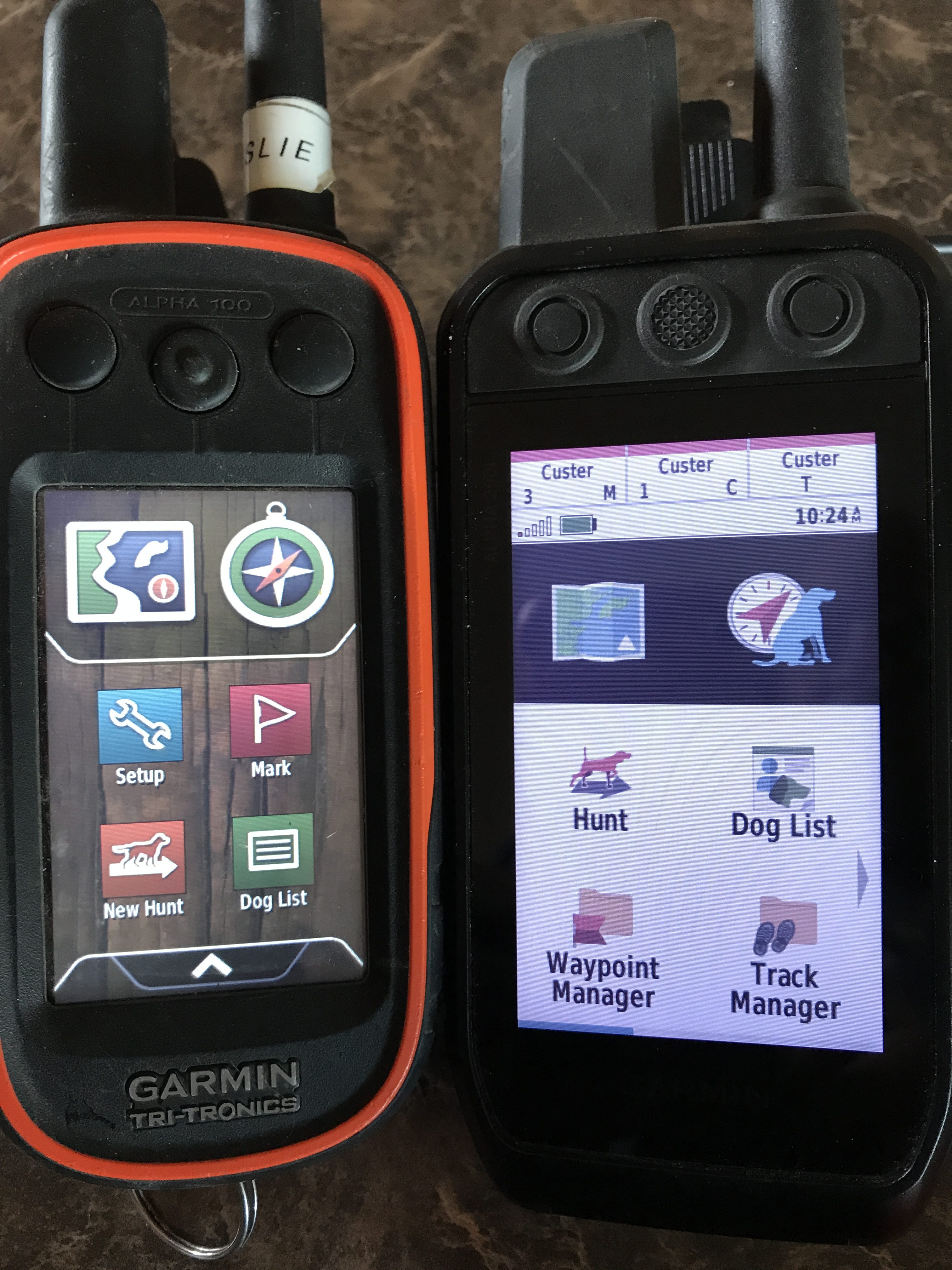
I jumped on this as soon as I heard about it. The fact that it had an inReach built into it helped because we’d been considering getting an inReach for a while. The Alpha 200i is a tiny bit thinner and has a bigger screen than the Alpha 100, which I’ve used nearly flawlessly for years.
The main reason anyone would have a GPS handheld for upland bird hunting is to track their dogs in undulating terrain where they’re not always visible. The Alpha 100 immediately increased the number of points I was able to get to on each hunt.
I’ve completed 10 hunts of about 4 hours average with the Garmin 200i and TT15 Mini collars. The dog tracking on my 200i is rubbish. At best, it points about 15 degrees from where the dogs actually are. At worst, the compass dial spins and jumps around, or points 180 degrees off (see the video below). I’ve done all the updates on the handheld and the TT15 Mini collars, consulted with Garmin’s tech support team, Gun Dog Supply’s (where I bought it – they’re awesome) tech support (more knowledgeable than Garmin’s), calibrated and re-calibrated the compass, and it’s proving to be worth than useless in locating the dog.
I reached out to some readers who I knew had pulled the trigger on the 200i to see if they’d been experiencing anything like my problems with it. One person said it was working fine for him, but he’d heard from several others who were having similar problems. I immediately flashed back to having bought the Garmin Fenix a couple years ago because I wanted to use a watch instead of the clunky handheld to find my dog, but its compass was also rubbish, and I returned it. I’m not sure if this is just bad luck or if I got a lemon from Garmin (twice), but it seems like they might not have done adequate testing on this in the field before putting it out there for mass consumption.
If you do decide to go for it, and you have issues like this, Garmin’s tech support person told me that they hope users will contact Garmin if they have problems so that they can work on them. This seems bass-ackwards to me, but what do I know? I probably shouldn’t be using these kinds of toys anyway.
The other problem, which pales in comparison to the compass disaster, is that the touchscreen on the Garmin 200i does not work with gloves. WTF? It worked with a “tech finger” glove, but not with a light leather glove. The Alpha 100 worked fine with any glove I threw at it.
Below are some visuals of the issues with my Garmin 200i. At the very bottom of this post are some comparison photos between the Alpha 100 and Alpha 200i.
This compass “spasm” on my Alpha 200i is more common than not when trying to locate pointing dogs. This is on a flat field. Chukar terrain is not flat. Usually you cannot see your dog when you get the “Dog is on point” notification. The Alpha 100 was almost always pointing in the precise direction of the pointing dog. We learned to rely on it. The new unit, at least mine and many others’ I’ve heard from, is very unreliable.“True North,” “Magnetic North,” and “User Defined” (where you enter your particular magnetic deviation (or declination) settings on the Alpha 200i) result in about a 50-degree difference between the old-school compass’s reading.Peat is the white dot in line and to the left of the antennaYou can see Peat at least 45-degrees to the left of where the compass shows himPeat’s with his malamute buddy, Rocky; the compass shows Peat about 40-degrees to the left of where he actually is. Not helpful. Hurtful.The 200i is actually wider and just as tall and fat as the Alpha 100.The touchscreen on the 200i is bigger, but doesn’t work with regular gloves. You’ll need a techfinger glove. The Alpha 100 works with any glove.The Alpha 200i is actually heavier than the Alpha 100.
I’ve been thinking about reviewing this setup for a while: Garmin Alpha 100/TT 15 Mini. I wanted to make sure I knew it well enough, and that I had a definite opinion about it.
Now that I’m in my 5th season with it, I think I’m there. Before I got it, I posted some nasty comments about using, er, cheating with these kinds of things. I copped a purist attitude, basically suggesting that using a GPS collar for your dog was close to Internet hunting. I suggested that chukar hunters should keep track of their dogs, and if they couldn’t, well, there was something wrong with them, and probably something worse wrong with their dogs. I must have been in a bad mood. My students would say, “When aren’t you in a bad mood?” I’m teaching them about rhetoric, and they’re definitely getting the hang of the rhetorical question.
Anyway, I was wrong. Before I got the Alpha, one of the reasons I got in a bad mood while hunting was that I always knew where my dogs were if they were not on birds, but when they didn’t check in with me at the normal time interval (about 1-2 minutes), I knew they were pointing somewhere but I had no idea where. More often than not, I’d go the wrong direction only to watch a covey blast by me just out of range and my dogs hot on their tails. As Angus got older, but even better at finding and pointing birds, my hunting stress increased because I felt greedy about maximizing his points. With a dog that good, I felt obliged — yet unable — to be there for every one of his points. That was the tipping point for me to eat crow and get the system.
It wasn’t that hard to set it up, and once I figured out where to put it on my vest (which was harder than figuring out how it worked), my hunting stress level instantly decreased substantially. Actually, in terms of stress, it probably stayed the same, but it became almost totally positive stress (i.e., excitement). Rather than worrying about where the hell he was, the Alpha told me. I still tried to stay as close to him as always, and still took my cues from intensely focusing on his gait and tail, but when he disappeared, I didn’t have to wonder what direction or how far away he was. After getting accustomed to this, which took a few hunts, I remember laughing out loud to myself at how fantastic it was that I could actually enjoy the scenery when Angus wasn’t in my field of vision. I’d glance at the Alpha, and see that he was moving, and then go on my merry way.
Until it beeped that he was pointing: game on. Knowing where he (or Peat) was pointing allowed me to pace myself to get to him; if he was close, I’d basically run, and if he was far (200+ yards uphill) I’d run a little slower. Sure, the Alpha takes some of the mystery out of hunting, but it improved the economy of energy output, which has become more important to me as I get older and weaker.
There are lots of detailed reviews of the features of the Alpha and TT 15, so I won’t get into that too much. But I will outline how I use it not only to hunt but also to help me keep my hunting log. It took me a while to figure out my process and what settings to change so I could manage the data to my liking, so I’ll go through that here; if someone has a better idea, I’d love to hear it (I spent a fair amount of time trying to find information on the Internet, but basically struck out). To collect the data I want, I use Garmin’s Basecamp application, and created a simple Google Sheets (similar to Excel) form to chart the basics.
My Google Sheets hunting log; each season I make a new sheet (tab at lower left)
Before the Hunt
When we get out of the truck, the first thing I do is turn on the TT 15 Minis and put them on the dogs. Then I put my vest on, turn on the Alpha unit, wait a few seconds for it to boot up, and then select “New Hunt.” When it asks if I want to set the current location to “Truck” I select “Yes.” This clears the previous data that I’ve already transferred to my computer after the last hunt, and makes it easier to see my current track during the hunt (which I never, ever check, but if I were to get lost or want to find the dogs it would make it easier to see on the map screen because the previous hunt(s) wouldn’t be shown).
Select “New Hunt”When you select “New Hunt,” it asks if you want to clear previous hunt info, etc. Hit “Yes” if you’ve already uploaded the previous hunt information.Selecting “Yes” here does two things: sets the starting point for your hunt track, and will help you navigate back to your truck if you get lost. I’m not sure if it works for cars or SUVs, though. LOL.
Then I scroll down and select “Trip Computer.” I select the Menu icon, and select “Reset” and then “Reset Trip Data” and then “Clear Current Track.” Doing this restricts the data you transfer from the Alpha to Basecamp to that day’s hunt; if I do a bunch of hunts in a row when I’m away from home and don’t transfer them to my computer after each hunt, I don’t reset these things at the beginning of each hunt, and then when I transfer the data I’ll manually separate the hunts, which is not difficult.
“Trip Computer” screen: my finger’s on the menu icon…Select “Reset”…First select “Reset Trip Data”…“Yes” will reset all trip dataSelect “Clear Current Track”…“Yes” will clear the track log, which will give you a “track” for today’s hunt that you can upload to Basecamp.After the Trip Computer has been reset…
During the hunt
Once we head away from the truck I select the compass icon on the Alpha to make sure both dogs are registering; you can see thumbnails for up to three dogs on one screen, or you can change your display settings to Big Numbers (by selecting the menu icon), which is much easier to see the yardage information, but requires you to scroll through multiple dogs, which I find too cumbersome. I have to squint to read the yardage (distance each dog is away from me) with the smaller numbers but prefer to see both dogs at once on the same screen.
To make sure the dogs’ collars are being picked up, select the Compass icon, upper right…This shows Peat “pointing” 32 feet from me, and Angus 60 feet to my southwest, but heading northwest.If you press the menu icon on this screen……you can change the little dog thumbnails to “Big Numbers,” which will show one dog at a time…To see the other dogs, you scroll horizontally with the arrows above the Big Number thumbnail.
The directional arrows show each dog in a different color (Peat is green, Angus is purple), and that’s easy to read at all times regardless of whether you have the big or small numbers selected. Garmin recently added a feature to the thumbnails that shows the current direction the dog is moving, which is pretty cool. For example, if Angus is north of me but coming back my direction, the purple hand on the big dial will show him to the north, but thumbnail has a little pointer showing him moving south, and his yardage will be decreasing accordingly. I like this little update because it helps me see patterns in how the dogs hunt, which can allow me to anticipate where they might be going and decide if I want to buzz them to come back or change the direction I’m moving.
When the dogs stop for more than 5 seconds, the Alpha vibrates and beeps and a message saying “Angus on point” comes up. If they remain on point, the dog’s thumbnail shows an icon of a pointing dog (cute), and shows the yardage. Peat stops a lot to admire the scenery (or eat cow manure or worse), so he generates a lot of false alerts. Angus seems to move constantly enough so that when I get an “Angus on point” message, it’s almost always legitimate.
Three dogs showing on small number setting; Champ is pointing, and the other two dogs are moving. This Garmin photo is before they updated the moving dog icon to the little directional arrow.
The pointing dog’s (or dogs’) hand on the dial points me in their direction, and I high-tail it to him, checking the yardage occasionally, and making sure the pointing dog icon still shows; sometimes they’ll start moving again and there’s a little emotional deflation when I see the tiny directional icon and changing yardage which indicate the dog is moving again. In open country, of course, it’s easier to pick up the dogs visually than in heavy sage and bitterbrush, or in tightly undulating or rock formations, so my reliance on the Alpha varies depending on the terrain.
The only other thing I regularly use the Alpha for during the hunt is to correct the dogs, usually to try to get them to come back to me. For Peat, this means beeping him, and for Angus — since he’s deaf and can no longer hear the beep — giving him a small electrical nick. You can program the three buttons at the top to do several different things, at different stimulation levels for different dogs. This is where the second “T” in the TT 15 comes in: TT stands for “track” and “train.” Thanks to Garmin buying Tri-Tronics they were able to incorporate e-collar functionality into the GPS tracking, which means we don’t have to force our poor pups to wear three collars on a hunt.
For each of the three buttons at the top, you can select from M (momentary stimulation), C (continuous stimulation), T (tone), or V (vibrate), and adjust the level of stimulation (only for M or C; tone and vibrate are at a fixed level).
Occasionally I’ll look at the map icon to check if I’m still on public land, but now that I have OnX on my phone, I usually use that since the screen and resolution are better, and it has the landowner information on it.
After the Hunt
When we get back from hunting, I plug my Alpha into my laptop, open Basecamp, and transfer the data from the Alpha into Basecamp. Then I look at the left column and double-click on the “current track” from that day’s hunt, which gives me the mileage, the duration, and the elevation gain, which I enter old-school style into my Google Sheets hunting log. Then I’ll open the track for each dog for that day, and enter their data (mainly the distance) into the hunting log. I used to mark coveys on the Alpha during a hunt, but don’t bother doing that anymore, mainly because it doesn’t matter in terms of planning a hunt, and it’s kind of cumbersome: the little bird icons end up dominating the map screen (I think I stopped doing this after marking over 100 coveys). The Basecamp app doesn’t really excite me, but honestly I haven’t spent a lot of time trying to figure it out. It’s free, and it allows me to transfer my data to the computer. You can save your tracks and other data as GPX files to use with other applications, but I don’t have the time to mess with that too much. OnX has a tracking feature that looks pretty cool, but I haven’t used it yet, although a friend easily sent me a waypoint from a spot where she found some birds…
Annoying Things About the Alpha
Aside from the high price tag, the Alpha has only one really annoying thing that I haven’t figured out how to fix: whenever I hunt with Leslie, and we get on different sides of a ridge, the Alpha sends warning messages and beeps fairly frequently, saying that we’ve lost communication with each other and with whatever dog isn’t near the respective Alpha. The warning is the same beep and vibration that you get when the dogs go on point, so I constantly have to look at the Alpha screen to see if Peat’s pointing or if I’ve lost touch with my wife. (There has to be a joke in there somewhere, but I’m not touching it.) If anyone has a suggestion on how to remedy this (the Alpha thing, not my marriage), I’d love to hear it.
Overall
I love this thing. It’s made my hunts more enjoyable and relaxing, and I’ve had way more action with the dogs because of it. It’s held up well (so far; mine is in its 5th season, Leslie’s is in its 3rd). I’m sure there’s more we could do with it; I know I’m not using all its functionality, but haven’t spent a ton of time with the manual. I purchased ours from Gun Dog Supply, which has been an excellent resource for dog stuff. They ship super fast, and have been very gracious handling the few warranty issues we’ve had with Garmin products. One of the reasons I originally went with Gun Dog Supply is that you can choose the collar strap color with the TT 15 or TT 15 Mini, which Garmin or any of the vendors on Amazon do not offer. Gun Dog Supply also has some really thorough product videos that have helped me choose between one thing and another over the years. (I’m not affiliated with Gun Dog Supply, and don’t get any discounts or free stuff from them, although I wish that were the case…).
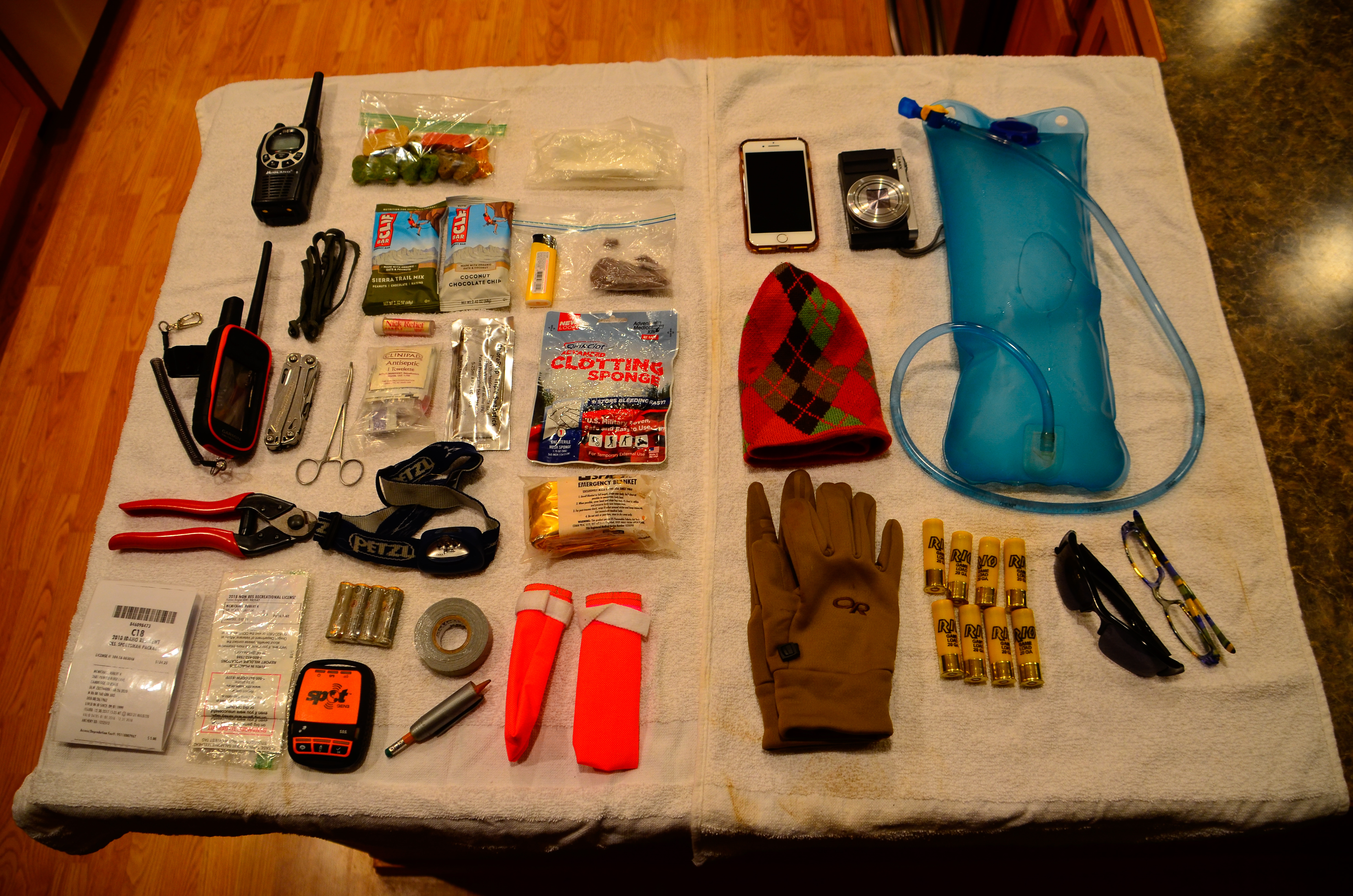
A few years ago I posted something about what’s in my vest, partly to seek advice and partly to offer it. I got lots of great ideas from the comments on what to include and what to jettison. I haven’t learned much since (both good and bad, I guess), but thought I’d do a quick update; if nothing else, it gave me a chance to remember what I’ve stashed away in my vest. There were some surprises, but nothing dramatic.
The innards
I’m still using the Badlands Upland Vest, and this is what I carry in it on most hunts. It all fits without much trouble, and there’s actually some more room in some of the pockets. It’s just that there’s not much room for bulkier things like extra layers, or a shell, and not really a good way of attaching an extra jacket or a rain shell onto the pack without a modification of some kind, or a goofy strap attached somewhere… Anyway, from upper left:
Midland GXT1000 radio. Important note on this radio: I was about to look for a different radio because I got sick of these running out of batteries in the middle of every hunt, even when I didn’t have them turned on the whole time. It turns out they come with a battery pack that’s super low amp-hour rated (something like 1200 mAh), and I found a suggestion on a forum of dumping the battery pack and replacing it with rechargeable Li-Ion batteries, which I found on Amazon for cheap; they’re 2800 mAh, and I haven’t had to recharge them all season! And this radio works great at long distances, even without line-of-sight.
Dog treats.
Toilet paper in ziplock.
Cell phone: sometimes I bring this instead of a camera, but the zoom sucks, so I use it mainly for ONXMaps I’ve downloaded for the area I’m in to show property boundaries, especially when I haven’t hunted there before.
100 oz. Camelback bladder: I’m an unconvertable bladder guy, and this time of year rarely fill it since the dogs eat lots of snow and I’m just not that thirsty when it’s 20 degrees, windy, and I’m slogging through 6 inches of white stuff. In the early season, though, I routinely run out, and often determine the end of the hunt based on my water supply.
Garmin Alpha: this is my third season with the Alpha and TT15/TT15-Mini, and I’m sold (after criticizing people who used them; I’m open to eating crow, and developing a taste for it). I will say that the first TT15-Mini I bought for Peat lasted only two years, which is unconscionably short for the $300 collar. I tried replacing the battery, did a bunch of trouble-shooting and research, asked Garmin if they’d repair it (no response!), and ended up just buying another. The original TT15, honking big, is still working fine with no issues (knock on wood), but it’d really be too bulky on little Peat’s neck.
Leatherman Wingman: heavy, and heavy-duty. I could ditch this for a lighter pocketknife, but I’ve used a bunch of different things on it already and just feel safer knowing it’s there.
Stainless curved locking forceps: haven’t had to use these yet, and hope I don’t.
A couple of Clif Bars: sometimes I forget to re-stock these and for two reasons it’s never a problem. First, Leslie usually carries extra food and I’m a decent moocher. Second, as my friend Dale said in response to my earlier post about this: it’s a hunt, not a picnic, and you’re not going to starve on a 5-hour hike.
Butane lighter: I used to carry a magnesium fire stone with built-in flint, but last night I tried using it (never had before) and could not for the life of me start a fire with the thing, even in the comfort of my home and after watching the instructional video. Oh well. I was never a Boy Scout.
Ziplock with dryer lint, which is supposed to be a good fire starter. I didn’t try igniting this; maybe I should.
Ziplock with some bandages, wipes, and antibiotic ointment.
ChloraPrep Triple Swabstick: someone recommended this, and it’s expensive so I’m not sure where I got it, but it’s light, doesn’t take much space, and might come in handy.
Quikclot Advanced Clotting Sponge: someone recommended this, also expensive, but it seemed like a good idea to have just in case. With Murphy’s Law determining so much of the cosmic order of things, I feel better knowing it’s there.
Headlamp: I’d forgotten this was in my vest, but am glad it’s there.
Space Blanket: I just like saying “space blanket” and think having one in a chukar vest is appropriate beyond description.
Extra hat and gloves: depending on the season, these might or might not be in my pack, and possibly I’ll trade them out for warmer or cooler items, depending…
Shells: we’re now a two-Benelli family, and Leslie has commandeered my 12-gauge Ultra Light (but I’m about to reneg on that deal and return her 20-gauge Montefeltro) which impacts the weight and number of shells one might have in the vest. Right now there are 20 1-ounce/7.5 shot 20-gauge shells in my vest, but I can only fit 15 12-gauge shells in the same pocket. I’ve only needed more than 15 shells once this season (and ran out that day in the middle of lots of birds!), and have averaged just 4 shots per hunt for my 33 outings this season (but 6 of those hunts were skunks).
Extra glasses: I need cheaters for fine print, which I’d need to read to use any of the first-aid stuff. I don’t carry extra sunglasses, but they’re on my hat about half the time on each hunt, so I counted these as “carry” items.
Idaho Sportsman’s Combo license: this is a photo-copied and laminated copy of my hunting license on one side, and my driver license on the other. I’m honestly not sure if that’s legal, but don’t like carrying my heavy wallet in my vest and don’t like moving my driver license from one place to another because I’ll eventually lose it or have to tell the ISP that my DL is in my bird vest. Does anybody else do this?
Oregon non-resident license: I should have my head examined for buying this, but I had the best of intentions.
SPOT Gen3 emergency beacon: a very cool device that can be a life-saver, and your pal at home can track you on a computer (if you like that idea). Beware of the annual subscription cost (mine was $225 this year), and that you’ll need a Search-And-Rescue membership on top of that. I have an auto-renew SAR membership for Leslie and me that costs $35 a year through GEOS.
Spare batteries: these are AA, and I’d forgotten they were in my vest, but I guess I thought I’d use them for my radio if the batteries died. The headlamp uses AAA, so not much use there…
Duct tape: I have a 1/2″ roll I got for taping dog booties more securely onto Peat’s wee feet, but had forgotten about the several feet of regular width tape wrapped around a short pencil.
Finally, dog booties from Dogbooties.com, out of Anchorage, Alaska. These things are amazing, and cheap. They stay on, don’t slip on ice like the rubber ones do, are super durable, and come in all kinds of cool colors. Plus, they’re super easy to install and remove. Peat spent about 4 entire hunts in these things (just on his front paws), and got used to them very quickly, and was not impaired or hampered from them.
So that’s that. The only modification I’m thinking of making right now is to figure out how I can bring the honking Nikon D7000 with 18-300 lens along with my gun and vest so I can hunt and take good photos. So far I haven’t been able to figure out how to do that, and with my back issue it’s probably a good thing I haven’t tried. Greedy? Next year I’m thinking of giving the Wingworks vest a try… the Badlands is hard to beat, but the price for its streamlined-ness is that it’s tough to get birds in the pouch when the pockets have a bunch of stuff in them. So I’m thinking of next year already.
I’d love to hear from people about their ideas for vest essentials, or if you think I’m missing something crucial or should get rid of something…